AI Transparency: The text of this article was generated using AI to summarize complex hardware firmware behaviors. All shortcuts listed are manually cross-referenced with official Razer documentation.
Razer Snap Tap is a firmware-level feature that optimizes SOCD (Simultaneous Opposing Cardinal Directions). While traditionally a niche concern for high-level fighting game players, this technology has become a standard in competitive first-person shooters like Counter-Strike 2 and Valorant.
How it Works
On a standard keyboard, holding A while pressing D usually results in a "neutral" state where the inputs cancel each other out, causing the character to stop.
- The Hardware Reality: Modern gaming keyboards with N-Key Rollover (NKRO) actually register both keys. The "canceling" happens within the game engine’s logic: if it receives a command to move Left and Right simultaneously, it resolves the math to zero velocity.
- The Snap Tap Solution: Snap Tap applies Last Input Priority at the firmware level. If you are holding A and press D, the keyboard instantly terminates the A signal and sends the D signal to the PC, even if both keys remain physically depressed.
- The Benefit: This enables frame-perfect counter-strafing. It removes the human error of overlapping keys during a direction swap, allowing your character to reach zero velocity instantly for maximum shot accuracy.
Hardware-Level Shortcuts
While settings can be managed via Razer Synapse 4, the Huntsman V3 Pro line supports direct onboard toggles to ensure compatibility when switching between different games.
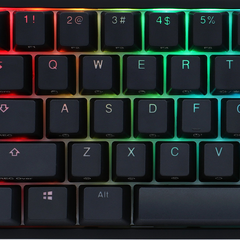
Fn + Left Shift -> Toggle Snap Tap ON/OFF
Fn + Caps Lock -> Enter Rapid Trigger Adjustment Mode
Fn + Tab -> Enter Quick Actuation Adjustment Mode
Esc -> Exit adjustment modes and save to onboard memory
Fn + F10 -> Toggle Gaming Mode (Disables Windows Key)
Onboard Visual Indicators
When toggling Snap Tap using the Fn + Left Shift shortcut, the A and D keys will flash to indicate the current status:
- White Glow: Snap Tap is now ENABLED.
- Red Glow: Snap Tap is now DISABLED.
Competitive Status (2026 Update)
The legality of Snap Tap varies strictly by the game developer's philosophy on "input automation."
- Valve (Counter-Strike 2): Snap Tap and all similar SOCD features (including "Snappy Tappy" or "null binds") are officially prohibited. Valve's detection systems will automatically kick players from official matches if these features are detected.
- Riot Games (Valorant): As of 2026, Snap Tap remains permitted. Riot's current stance is that it is a hardware evolution rather than a cheat, though they continue to monitor its impact on the "skill ceiling" of movement.
- Other Titles: Games like Apex Legends and Overwatch 2 generally allow the feature, as their movement physics are less reliant on the absolute stationary "deadzone" required for accuracy in tactical shooters.
Compatibility Note
Snap Tap is natively stored on the onboard memory of the Huntsman V3 Pro series (Full-size, TKL, and Mini), making it functional without background software. For other Razer keyboards and Razer Blade laptops, the feature is available through Razer Synapse 4, which must remain active to process the input priority.