
|
|
Strategies |
||
|
|
Properties |
||
|
|
Data series |
||
|
|
Toggle plot executions |
||
|
|
Reload NinjaScript |
||
|
|
Show data box |
||
|
|
Pointer |
||
|
|
Crosshair |
||
|
|
Global crosshair |
||
|
|
Global crosshair (no time scroll) |
||
|
|
Arrow line |
||
|
|
Extended line |
||
|
|
Fibonacci circle |
||
|
|
Fibonacci extension |
||
|
|
Fibonacci retracement |
||
|
|
Fibonacci time extension |
||
|
|
Horizontal line |
||
|
|
Line |
||
|
|
Path |
||
|
|
Volume profile |
||
|
|
Ray |
||
|
|
Region highlight X |
||
|
|
Region highlight Y |
||
|
|
Risk-reward |
||
|
|
Ruler |
||
|
|
Text |
||
|
|
Trend channel |
||
|
|
Vertical line |
||
|
|
Triangle |
||
|
|
Triangle down |
||
|
|
Triangle up |
||
|
|
Time cycles |
||
|
|
Diamond |
||
|
|
Dot |
||
|
|
Ellipse |
||
|
|
Square |
||
|
|
Rectangle |
||
|
|
Regression channel |
||
|
|
Polygon |
||
|
|
Gann fan |
||
|
|
Arc |
||
|
|
Andrew's pitchfork |
||
|
|
Bar spacing decrease / increase |
||
|
|
Reload all historical data |
||
|
|
Zoom out |
||
|
|
Indicators |
||
|
|
Crosshair lock |
||
|
|
Arrow down |
||
|
|
Arrow up |
||
|
|
Save chart image |
||
|
|
Zoom in |
||
|
|
Bar width decrease / increase |
||
|
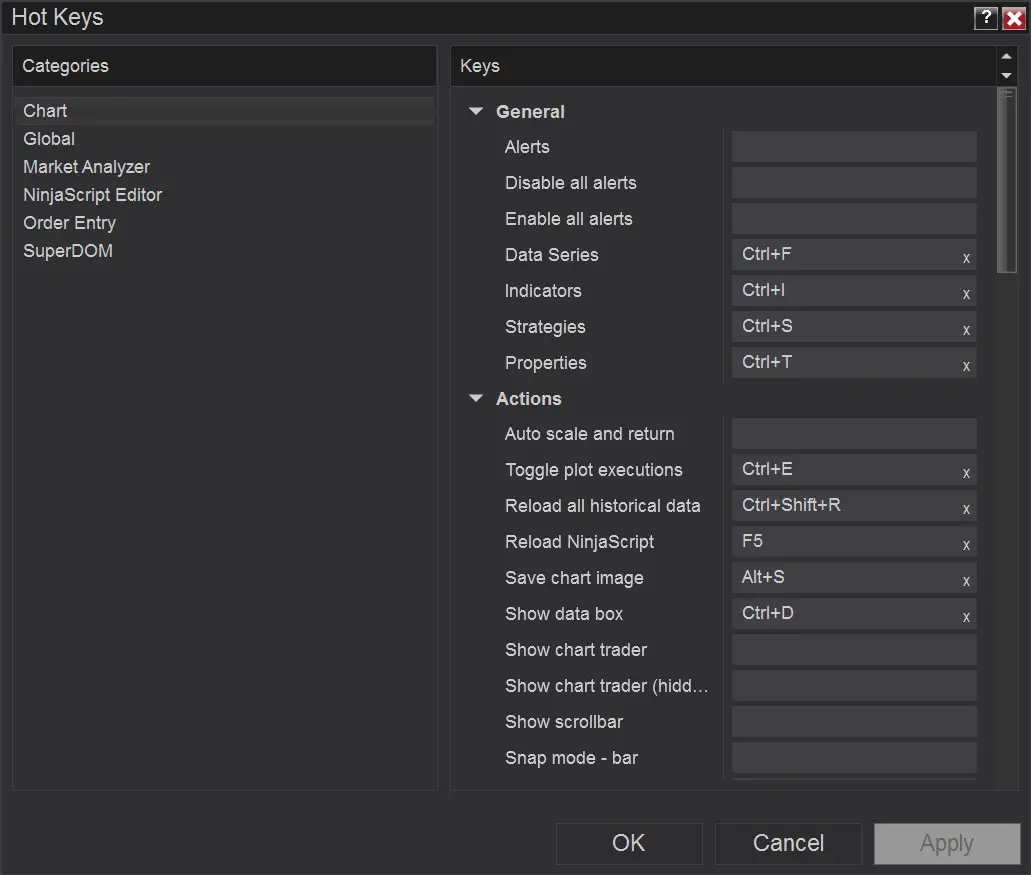
All shortcuts are assigned to hotkeys in this section.
|
|||
|
All shortcuts are assigned to hotkeys in this section.
|
|||
Non-assigned, available actions are |
|||
|
Auto scale and return, Show chart trader, Show chart trader (hidden), Show scrollbar, Snap mode - bar, Snap mode - bar and price, Snap mode - disabled, Snap mode - price.
|
|||
Non-assigned, available actions are |
|||
|
Alerts, Disable all alerts, Enable all alerts.
|
|||
Non-assigned, available actions are |
|||
|
Stay in draw mode, Remove drawing objects.
|
|||
|
Source: Program interface (Tools > Hotkeys menu)
|
|||
Ninja Trader 8 keyboard shortcuts
Ninja Trader 8 hotkeys are powerful trading tool, however misuse of these hotkeys can lead to unexpected trades and therefore loss of money. To limit risk of unexpected order placement, you need to become familiar with the features of keyboard shortcuts.
Ninja Trader 8
Ninja Trader 8 hotkeys are powerful trading tool, however misuse of these hotkeys can lead to unexpected trades and therefore loss of money. To limit risk of unexpected order placement, you need to become familiar with the features of keyboard shortcuts.
Table of contents
Advertisement
Program information
Program name:

NinjaTrader offers software and brokerage services for active traders. The software has features such as charting, real-time analysis, and customizable technical indicators. NinjaTrader is regulated in the United States by the National Futures Association and the Commodity Futures Trading Commission.
Web page: ninjatrader.com
How easy to press shortcuts: 87%
More information >>Similar programs




Tools
Ninja Trader 8:Learn: Jump to a random shortcut
Hardest shortcut of Ninja Trader 8
Other
What is your favorite Ninja Trader 8 hotkey? Do you have any useful tips for it? Let other users know below.
1147159 170
519916 8
419545 373
411143 6
329513 7
296579 38
13 hours ago
14 hours ago
16 hours ago
2 days ago Updated!
2 days ago
2 days ago Updated!
Latest articles
How to Turn Telegram Into Private Text Bridge
Guide: Razer Snap Tap (SOCD)
Google Graveyard is also dying
Keep these "nonsense" away from EV owners!
How to spot an AI-generated article